An autonomous agent is useful because it can read your systems and act in them. That is also what makes it risky. Building secure agent infrastructure is less about the model and more about the pipeline around it: how the agent connects, what it may touch, who approves what, and what is recorded.
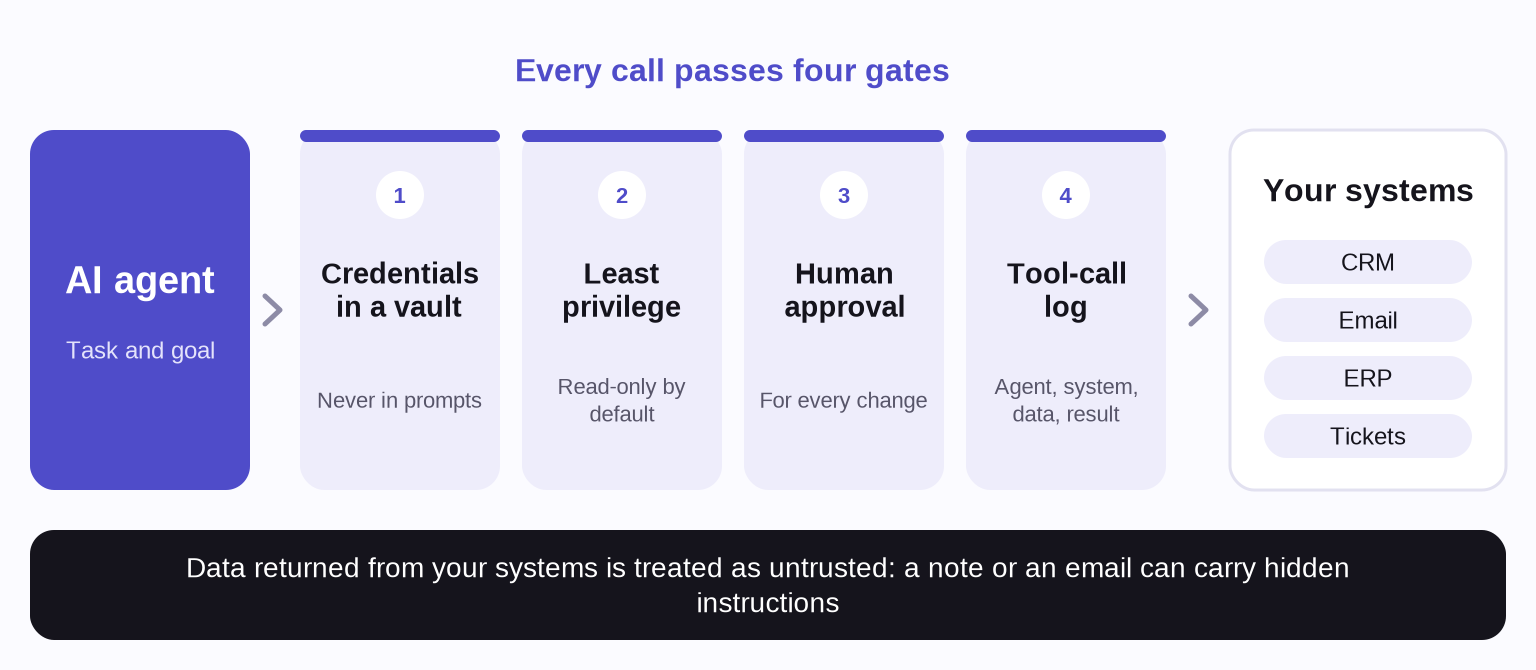
1. Connect to the data, do not copy it
Agents should call your CRM, email, ERP or ticketing system when a task needs data, and read only what that task needs. Bulk-copying records into another platform creates stale data, extra GDPR exposure and harder security reviews. Store only what the platform itself needs: metadata, workflow results, evidence and references to the source records.
2. Use one standard interface
The Model Context Protocol (MCP) gives agents one consistent way to use tools, so the agent does not need to know whether it is talking to one CRM or another. Use mature existing MCP servers where they exist, check how well each is maintained, and wrap other APIs in your own so every tool looks the same.
3. Least privilege, read-only by default
Give each agent the narrowest OAuth scopes that do the job. Start read-only. Credentials belong in a secrets vault, per tenant, never in prompts or agent configuration.
4. People approve changes
Reading is low risk. Writing is not: updating a CRM deal, sending an email, booking an invoice. Require human approval for write actions until the owner explicitly allows automatic approval for that specific action.
5. Treat everything from your systems as untrusted
A CRM note, an email or a web page can contain hidden instructions meant for the agent. This is prompt injection, and OWASP lists it, together with excessive agency, among the main risks for LLM applications. Keep instructions and data apart, limit what a single task can do, and check results before they take effect.
6. Log every tool call
Record which agent called which system, with what data, when, and with what result. The same log serves incident response, customer security reviews and audits such as ISO/IEC 42001, which expects records of AI operation, human oversight and third-party data access.
When data may not leave the network
Banks, healthcare, government and companies with on-premises systems often cannot let data leave their environment. The pattern for them is a small runner deployed in their own cloud or data centre. It connects outbound only, so no inbound ports are opened, runs the agents and connectors next to the data, and sends back only results, status and audit logs. The control plane stays central; only the hands move.
If you are planning agents that touch real systems, book a discovery call and we will review your pipeline against these six rules.
Sources
- OWASP Top 10 for LLM ApplicationsPrompt injection and excessive agency among the main risks for LLM applications
- Model Context ProtocolThe open standard for connecting AI applications to tools and data
- ISO/IEC 42001:2023, AI management systemsManagement system requirements, including operation records and oversight